Easy To Use Blender Edition1.6
Publisher Description
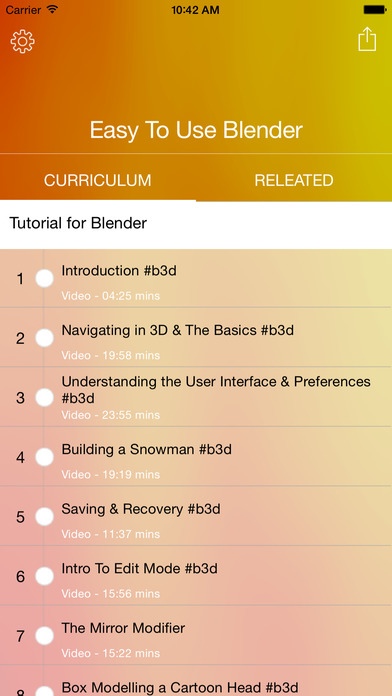
Lecture 01. Introduction #b3d
Lecture 02. Navigating in 3D & The Basics #b3d
Lecture 03. Understanding the User Interface & Preferences #b3d
Lecture 04. Building a Snowman #b3d
Lecture 05. Saving & Recovery #b3d
Lecture 06. Intro To Edit Mode #b3d
Lecture 07. The Mirror Modifier
Lecture 08. Box Modelling a Cartoon Head #b3d
Lecture 09. Smoothing & SubSurf #b3d
Lecture 10. Adding 3D Text #b3d
Lecture 11. Intro to Materials & Nodes in Cycles #b3d
Lecture 12. Intro to Lighting & Rendering in Cycles #b3d
Lecture 13. Image Textures & Bump Maps #b3d
Lecture 14. UV Mapping (Unwrapping for Image Textures)
Lecture 15. Intro to Animation
Lecture 16. Linking Objects (Parent/Child)
Lecture 17. Joining & Separating Objects
Lecture 18. Rendering a Movie File
Lecture 19. Edge Slide & Vertex Slide
Lecture 20. The Bevel Tool
Lecture 21. The Inset Faces Tool
Lecture 22. Dissolve & Limited Dissolve #b3d
Lecture 23. Joining, Merging & Filling Holes #b3d
Lecture 24. The Knife Tool #b3d
Lecture 25. Solidify #b3d
Lecture 26. Symmetrize #b3d
Lecture 27. Snapping & Removing Doubles
Lecture 28. The Boolean Modifier
Lecture 29. The Remesh Modifier #b3d
Lecture 30. Pie Menus #b3d
Lecture 31. The Array Modifier #b3d
Lecture 32. The Bevel Modifier #b3d
Lecture 33. Proportional Editing #b3d
Lecture 34. Sharp Edges on Smooth Objects #b3d
Lecture 35. Intro to Bones & Rigging (Minecraft) #b3d
Lecture 36. Weight Paint Mode (Minecraft) #b3d
Lecture 37. UV Mapping for Minecraft #b3d
Lecture 38. IK Rigging (Part 1/2) #b3d
Lecture 39. IK Rigging (Part 2/2) #b3d
Lecture 40. Custom Bone Shapes #b3d
Lecture 41. Eye Rigging for Minecraft #b3d
Lecture 42. Face Rigging (Part 1/3 : Modeling & Bones) #b3d
Lecture 43. Face Rigging (Part 2/3 : Shape Keys and Drivers) #b3d
Lecture 44. Face Rigging (Part 3/3: Mouth, Tongue, & Finishing Up) #b3d
Lecture 45. Sky Color vs Sky Light (Light Path node) #b3d
Lecture 46. Depth of Field (Focus Blur) #b3d
Lecture 47. Eliminating Fireflies (Render Noise) #b3d
Lecture 48. Image Textures with Transparency #b3d
Lecture 49. Decals, Graffiti & Dirt #b3d
Lecture 50. Simulating Physics #b3d
Lecture 51. Camera Targets #b3d
Requires iOS 8.0 or later. Compatible with iPhone, iPad, and iPod touch.
About Easy To Use Blender Edition
The company that develops Easy To Use Blender Edition is Nguyen Thuc. The latest version released by its developer is 1.6.
To install Easy To Use Blender Edition on your iOS device, just click the green Continue To App button above to start the installation process. The app is listed on our website since 2015-11-16 and was downloaded 7 times. We have already checked if the download link is safe, however for your own protection we recommend that you scan the downloaded app with your antivirus. Your antivirus may detect the Easy To Use Blender Edition as malware if the download link is broken.
How to install Easy To Use Blender Edition on your iOS device:
- Click on the Continue To App button on our website. This will redirect you to the App Store.
- Once the Easy To Use Blender Edition is shown in the iTunes listing of your iOS device, you can start its download and installation. Tap on the GET button to the right of the app to start downloading it.
- If you are not logged-in the iOS appstore app, you'll be prompted for your your Apple ID and/or password.
- After Easy To Use Blender Edition is downloaded, you'll see an INSTALL button to the right. Tap on it to start the actual installation of the iOS app.
- Once installation is finished you can tap on the OPEN button to start it. Its icon will also be added to your device home screen.
